Principal Seat App Store

Your contracts, your hours and your next client, in one private place.

Career holds each client, the hours and the invoices. Household stays separate, and you can share it with the person you live with.

Who it's for: Independent software developers and cloud, data, IT and security contractors who bill by the hour or by the project, often for two or three clients at a time.
Download on the App Store

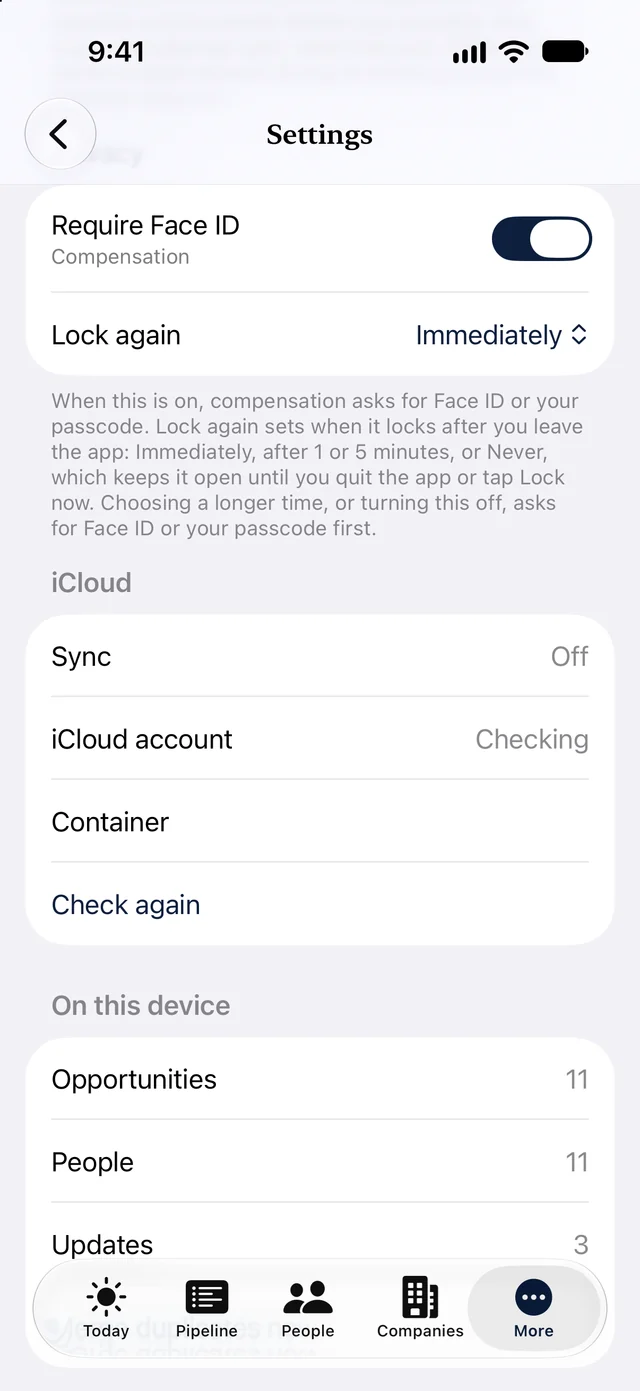
The Privacy section of Settings on iPhone with Require Face ID switched on for Compensation and Lock again set to Immediately
Video coming soon

Three ways tech contractors use it

1. Know where every contract stands.

Track each client and lead by stage, from Lead to Renewal, with the contract end date in view.

  • A renewal reminder before each contract ends
  • Draft renewal proposal copies your last accepted proposal
  • Clients only and Job search only filters keep contract work and staff roles apart
More

The Consultant template has the stages Lead, Proposal, Signed, Active and Renewal, and fields for fee, hours, term and renewal date. Paste an agency email into the Inbox to make a new lead. Mark a proposal Accepted and the client moves to Signed. Clients, proposals, contracts, invoices and hours are part of Premium Portfolio.

  • Coming soon Pick Tech contractors when you first open the app. Today you start with the Consultant template.

2. Turn hours into invoices.

Log hours on each client, then tap Bill these hours to make a new invoice from the hours you have not billed yet.

  • Fixed-fee, hourly and expense lines on one invoice, with expenses grouped and subtotaled
  • Deposit and balance invoices with your own payment link
  • Record a payment or Mark paid when the client pays
More

Hours are billable by default. Export your hours as a CSV file. Today shows overdue invoices as a count only. Principal Seat does not process payments or take a fee. Your default payment link from your own payment provider goes on each new invoice.

  • Coming soon Hourly lines that print the hours and the rate, and adding hours to a draft invoice.
  • Coming soon Bill by the day as well as by the hour.
  • Coming soon Import hours from a timer app's CSV export.
  • Coming soon Repeating retainer invoices, and a project split into milestone invoices.

3. Paperwork for any client, anywhere.

Proposals from your saved packages, a statement of work from a template, and invoices in each client's currency.

  • A currency per client. Amounts are never converted
  • Tax per line, with a reverse charge note for EU business clients
  • Share the statement of work to your own e-sign app
More

Set a business currency, and a different one for any client who pays in another. Each line has a Taxable switch. With your VAT number and the client's set, a business client in another EU country gets a reverse charge note. PDFs carry your logo. Templates are a starting point, not legal advice. Works on Mac, iPhone and iPad.

  • Coming soon A code name for each client on screen, with the legal name printed only on your documents.

Your AI assistant, like ChatGPT, Gemini, Claude or Grok, helps with the words. Send it your client list with rates left out, ask it to write up the work, then add the prices yourself.

A month with Principal Seat (fictional example)

Kofi Brannigan was a staff engineer and now contracts as Brannigan Software.

  1. Monday: on the Mac, Quillmarsh Bank bills in US dollars and Velderwick GmbH in euros.
  2. Tuesday: an agency email about Hollystone Analytics becomes a new lead.
  3. Friday: Bill these hours makes a new invoice for Quillmarsh Bank.
  4. Two weeks later: the Velderwick renewal reminder arrives, and Draft renewal proposal gives Kofi a head start.
  5. Payment day: Kofi records the payment. The reminder never showed the amount.
  6. What never went out: rates, totals and client addresses, for every AI send.
Read Kofi's full story
  • Monday. On the Mac, the Clients only filter shows Quillmarsh Bank (Active, hourly, US dollars) and Velderwick GmbH (Active, fixed project, euros). Velderwick's contract ends November 30.
  • Tuesday. Juno Farrant at Corbelline Talent, a contract agency, emails about a 6 month role at Hollystone Analytics. Kofi pastes the email into the Inbox, makes a new lead and sets a follow-up.
  • Friday. Kofi taps Bill these hours on Quillmarsh Bank. The hours Kofi has not billed yet go on a new invoice, with the next invoice number and Kofi's default payment link. Kofi emails the PDF to Quillmarsh Bank's accounts team.
  • Two weeks later. The renewal reminder for Velderwick GmbH arrives. Kofi taps Draft renewal proposal, asks an AI assistant for scope wording with no prices, adds the prices behind Face ID or Touch ID and sends it to Mira Vaclavik.
  • Payment day. Quillmarsh Bank pays. The payment due reminder never showed the amount. Kofi records the payment, and the invoice is marked paid.
  • What never went out. Rates and totals, because Include pay, rates and prices stayed off for every AI send, and client email and phone, because Include contact details stayed off. Client postal addresses are never sent. Kofi uses Premium Portfolio.

Privacy

  • Client data stays on your devices and in your own iCloud. We do not receive it.
  • Rates, amounts and contact details go out only when you turn them on.
  • Amounts sit behind Face ID or Touch ID, and payment reminders never show them.
More on privacy
  • Your data stays with you. Your data stays on your devices and in your own iCloud account. We do not receive it. The app has no accounts, no analytics, no ads and no tracking.
  • Rates go only when you say so. Rates, proposal amounts and invoice amounts go to your AI assistant, a snapshot or Export my data only when you turn on Include pay, rates and prices. The PDFs you send a client always show the amounts.
  • Typed text goes as written. Keep rates in the fee fields, not in notes, so the pay switch covers them. Where an NDA asks, keep client names out of titles and notes.
  • Contact details are off by default. Client email, phone, LinkedIn and website go to your AI assistant or a snapshot only if you turn on Include contact details. Names and roles are always included. Client and contact postal addresses are never sent.
  • Amounts stay off your lock screen. Payment due reminders never show the amount. Client names stay off your Lock Screen unless you turn on Show names on Lock Screen. On a Mac, notifications name the client, so set Show previews to When Unlocked in System Settings before you share your screen.
  • Your export, your choice. Export my data includes a Business folder with your proposals, invoices and contracts. Amounts and payment links go in only with Include pay, rates and prices on.

See the privacy policy.

The rest of your life, in the same app

Contracts and hours stay in Career. Household stays separate, shared only if you choose.

  • Laptop, monitor and phone warranties, and the renters or home insurance policy, in Household.
  • Share Household with the person you live with. Your contracts, rates and hours stay private.
  • To try an independent practice in Demo mode, try Riley Brennan. Open Settings, Help and demo, pick the made-up person, and turn on the selected demo. Your own info stays as it is.

Fictional examples. See how spaces work. Sharing limits are on Plans.

Plans

Free

5 live opportunities plus one file import. iCloud sync included.
One client at a time, with proposals, contracts and hours, and one invoice in total. A deposit and its balance count as one.

Premium

$14.99 a month, or $99 a year, or a $59 six-month pass that does not renew. The monthly and yearly plans share one 14-day free trial with Premium Portfolio.
For a job search between contracts: unlimited live opportunities, prep sheets, Compare two or three offers with your current role and two-way calendar sync.
One client, the same as Free.

Premium Portfolio

$24.99 a month or $199 a year. The monthly and yearly plans share one 14-day free trial with Premium. There is no six-month pass for Premium Portfolio.
Best for two or more clients: everything in Premium, plus unlimited clients, proposals, contracts, invoices and hours, with renewal reminders for every client. If Premium Portfolio ends, nothing is deleted. One client remains editable within the Free limits; the rest stay visible, read only. You can still record payments, mark invoices paid and save or share your PDFs. See Plans for the full limits.

The Apple Watch app is free. All paid plans share one 14-day free trial. Prices and details may change. Compare plans

Principal Seat app icon: a gold executive chair on navy

Run your contracts in private.

On the App Store for iPhone, iPad, Mac and Apple Watch.

Download on the App Store